Commercial · Toronto
Access Control Installation
The back door of the shop runs on one key, and by now it lives on six different rings: yours, two managers, a cleaner, a supplier who restocks early, and a keyholder nobody quite remembers approving.
Access Control Installation
In plain words
Where a building has more than one controlled door, a networked system lets each opening run its own schedule: the front office unlocked for regular hours, a stockroom open to two people only, a loading dock released for a delivery window, with the management software tying those schedules together. A shared entrance in a multi-tenant building can carry each tenant's own credentials without giving one business access to another's suite, and the same platform keeps a combined log, so a manager checking last night's entries never has to walk the building door by door.
How the visit goesAnother employee left and the keys never came back. You changed the locks again, cut copies for everyone who stayed, and paid for a job that repeats itself the next time someone quits, taking a working key out the door with them.
Toronto
How the visit goes
Power, cabling, and where the controller will live
An access control system needs somewhere for its low-voltage wiring to run and somewhere secure for the controller and its power supply to sit, away from public reach. The survey traces a path from each opening back to that location, checks whether existing conduit or cable trays can be reused, and confirms what power is already available against what a new circuit or a battery backup needs to supply. A building with exposed ceilings or accessible risers is a simpler pull than one with finished walls throughout, and that difference shapes how the installation is sequenced.
Fitting an electric strike
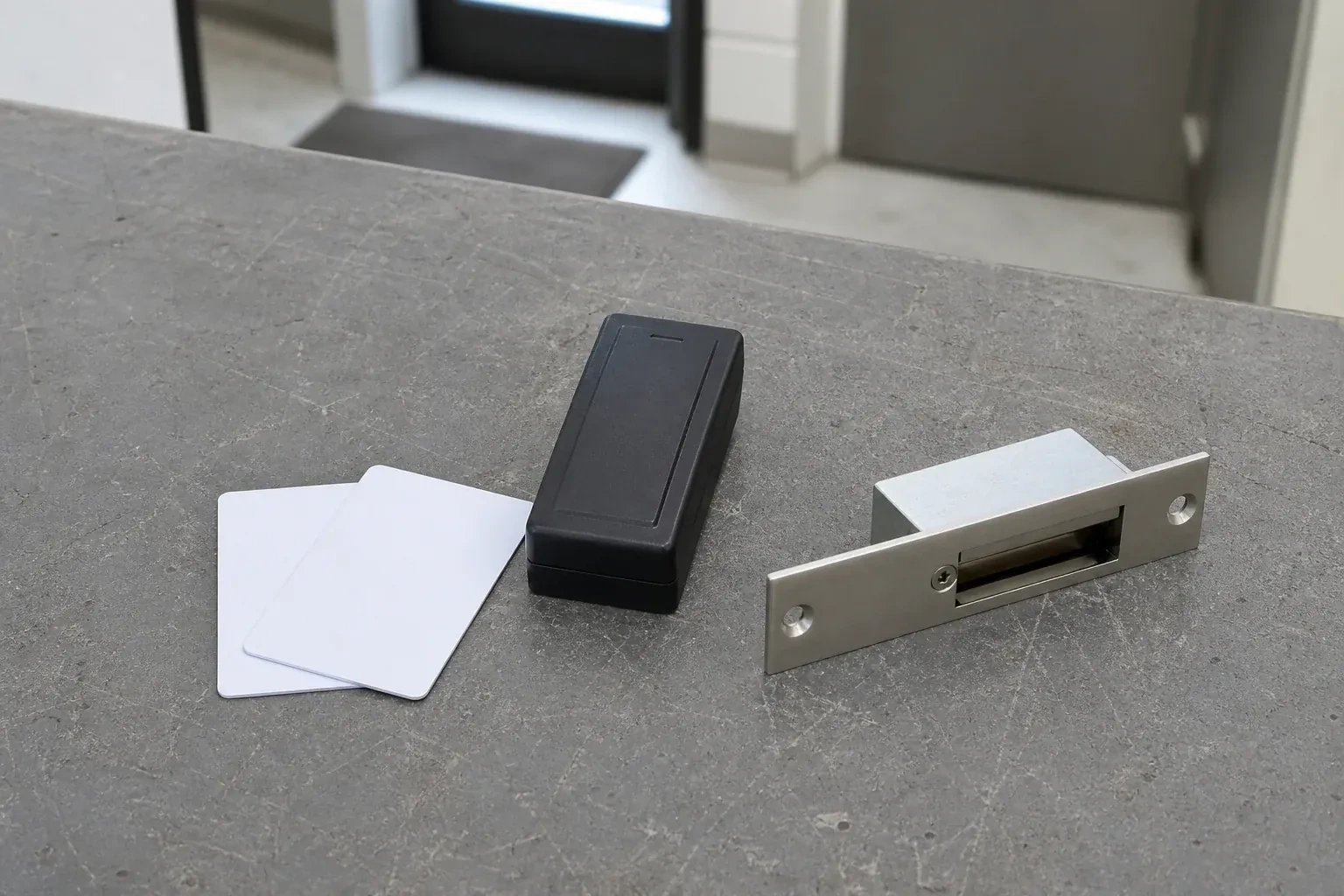
Where the frame allows it, an electric strike replaces the fixed keeper the latch normally strikes against, so the door keeps its existing latch and lockset and simply releases the strike plate when a valid credential is presented. The locksmith mortises the frame to fit the strike body, runs a low-voltage cable within the frame or jamb back to the controller, and sets the strike to hold the door secure until the controller sends a release signal. Because the latch itself never changes, the door still closes and locks normally by hand at any time, credential or no credential.
Keeping the mechanical override where it belongs
Where a controlled door has a mechanical override, that key is worth treating with the same care as any master key: held by a named person or two, not left in a drawer everyone can reach, and used mainly as a fallback rather than a daily habit. Because that key bypasses the electronic record entirely, using it routinely quietly undoes the audit trail the system was installed to provide, on any door where one is fitted. Keeping it for genuine emergencies is what keeps the electronic system the normal way in, and the key the backup it was meant to be.
Access Control Installation
In the van
- Low-voltage cable
- Door position switches
- Mechanical override cylinders
- Request-to-exit devices
- Electric strikes
What affects the quote
Same fees day, night or weekend
1The building's age and frame material
A modern hollow metal frame generally accepts new hardware with less adjustment than an older wood frame or a historic building, where matching the existing appearance and construction takes extra care.
2Network readiness for a networked system
A networked controller needs a suitable connection point and technology-department approval to join the building's network; where that is not already in place, preparing it is a separate piece of the job from the door hardware itself.
3How many credentials and what type
Cards, fobs, keypad codes and mobile credentials each involve different issuing steps, and a system enrolling a handful of managers is a shorter task than one enrolling an entire staff across several shifts.
Access Control Installation: questions
What credential types are available: cards, codes, fobs, phones?
A proximity card or fob held near a reader, a code typed on a keypad, or a mobile credential read from a phone are all in common use, and a single building can mix them by door or by person. Cards and fobs are simple to issue and switch off individually; a keypad needs no card to lose but a shared code eventually gets passed around; a mobile credential ties entry to a device the person already carries.
How long does an installation usually take?
A single standalone door is usually finished within a day, including testing and training. A building with several networked openings, cabling to run and a controller to program takes longer, and is often planned across more than one visit so cabling, hardware, and software configuration each get proper attention rather than being rushed through in one pass.
What's the difference between a standalone and a networked system?
A standalone unit is a self-contained reader and lock at one door, holding its own list of credentials, though it can still need a power or network connection to run. A networked system ties several doors to shared management, sometimes through more than one controller, aggregating schedules and combining logs across all of them. The right choice depends on how many doors need controlling and whether the business wants a single place to manage all of them, rather than one being universally better.
Commercial Locks
- Master Key System DesignThe new wing was built with its own brand of cylinder, so the two-year-old keys from the original…
- Panic & Exit HardwareThe fire inspector's note is blunt: the banquet hall's second exit still turns on a deadbolt, and…
- Commercial-Grade Lock ReplacementA new tenant moved into the unit next door, and the property manager just found three different…
Access Control Installation near you
For a household in Toronto the common requests are a rekey after moving in, a lockout, a deadbolt that grinds, and a lock that finally needs replacing. For a business they are storefront hardware, staff key control and exit devices. Both lists, and a few less common jobs, are laid out here.